


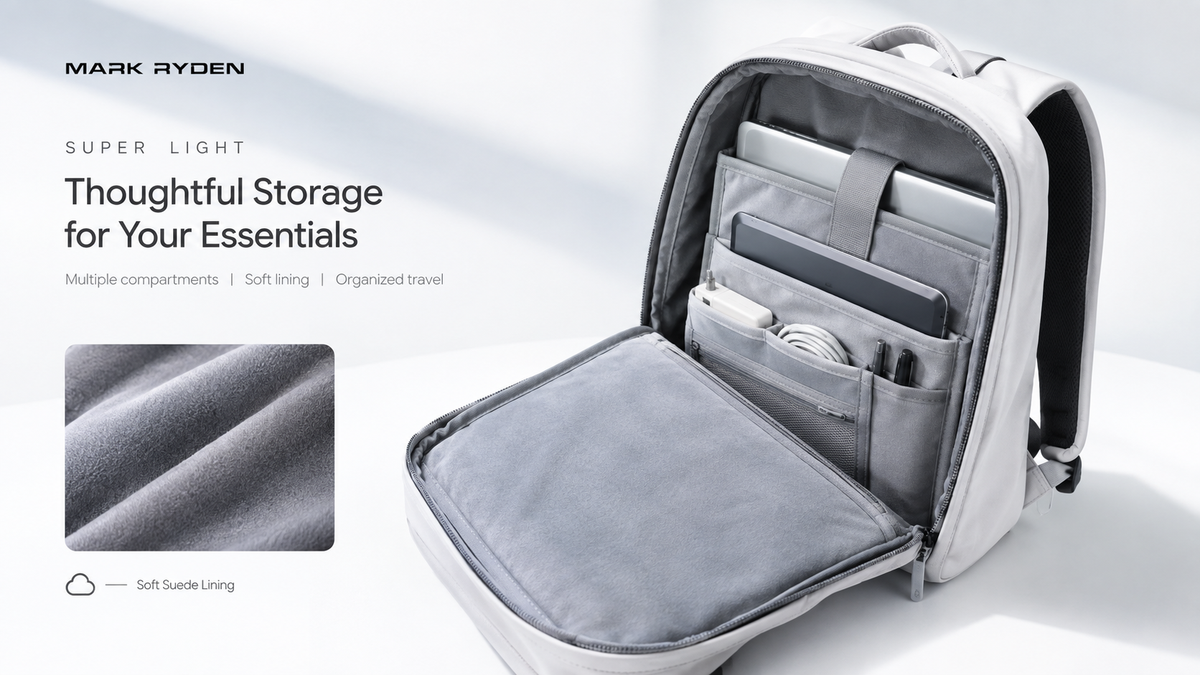
Ein Laptop ist für viele Menschen zu einem unverzichtbaren Begleiter im Alltag geworden. Ob Sie ins Büro pendeln, in einem Café arbeiten, an der Universität studieren oder zwischen verschiedenen Arbeitsorten wechseln – ein sicherer und bequemer Transport Ihres Laptops kann einen spürbaren Unterschied in Ihrem Alltag machen.
Ein Laptoprucksack ist mehr als ein gewöhnlicher Rucksack mit einem Laptopfach. Das richtige Design sollte genügend Platz für Ihren Computer und Ihr Zubehör bieten, alles übersichtlich aufbewahren und für einen bequemen Tragekomfort sorgen.
Bei der Wahl eines Laptoprucksacks sollten Sie mehr als nur die Größe des Laptopfachs berücksichtigen. Laptopkompatibilität, Polsterung, Ordnungssystem, Tragekomfort, Fassungsvermögen, Strapazierfähigkeit und Witterungsbeständigkeit beeinflussen alle, wie praktisch der Rucksack im Alltag ist.
Dieser Leitfaden erklärt, worauf Sie bei der Wahl eines Laptoprucksacks für die Arbeit, das Pendeln, die Schule und den täglichen Gebrauch achten sollten.
Was macht einen guten Laptoprucksack aus?
Ein guter Laptoprucksack sollte Ihren Computer schützen und gleichzeitig genügend Platz für alles andere bieten, was Sie im Laufe des Tages mit sich führen.
Wichtige Merkmale, die Sie berücksichtigen sollten, sind:
-
Ein spezielles Laptopfach
-
Passende Laptopkompatibilität
-
Ausreichende Polsterung
-
Praktisches Ordnungssystem
-
Bequeme Schultergurte
-
Strapazierfähige Materialien
-
Angemessenes Fassungsvermögen
-
Schutz vor alltäglichen Feuchtigkeitseinflüssen
-
Schneller Zugriff auf häufig verwendete Gegenstände
Die beste Kombination hängt von Ihrem Alltag ab.
Jemand, der nur einen Laptop und ein Ladegerät mit sich führt, bevorzugt möglicherweise einen kompakten Rucksack, während jemand, der mit Laptop, Mittagessen, Notizbuch, Kopfhörern, Wasserflasche und persönlichen Gegenständen pendelt, deutlich mehr Platz benötigt.
Welche Größe Laptoprucksack benötigen Sie?
Laptoprucksäcke sind in verschiedenen Größen und Fassungsvermögen erhältlich, daher gibt es keine Einheitsgröße, die für jeden geeignet ist.
Beginnen Sie damit, Ihren Laptop zu berücksichtigen, und denken Sie dann an alles andere, was Sie normalerweise mit sich führen.
Für einen Laptop und grundlegende Essentials
Ein kleinerer Rucksack kann ausreichen, wenn Ihre tägliche Ausstattung hauptsächlich aus Folgendem besteht:
-
Laptop
-
Ladegerät
-
Notizbuch
-
Smartphone
-
Geldbörse
-
Kopfhörer
-
Kleine persönliche Gegenstände
Ein kompaktes Design kann sich leichter durch belebte Straßen, öffentliche Verkehrsmittel oder überfüllte Büros tragen lassen.
Für Arbeit und tägliches Pendeln
Wenn Sie regelmäßig zusätzliche Gegenstände mit sich führen, kann ein Rucksack mit einem Volumen von etwa 20–30 l mehr Flexibilität bieten.
Sie benötigen möglicherweise Platz für:
-
Laptop
-
Tablet
-
Dokumente
-
Notizbuch
-
Ladegerät
-
Powerbank
-
Kopfhörer
-
Wasserflasche
-
Mittagessen
-
Leichte Jacke
Diese Kapazitätsspanne bietet für viele Pendler eine sinnvolle Balance zwischen Stauraum und Tragbarkeit.
Für Arbeit und Reisen
Wenn Ihr Rucksack sowohl für Ihr tägliches Pendeln als auch für kurze Geschäftsreisen geeignet sein muss, kann zusätzlicher Platz nützlich sein.
Ein größerer Rucksack kann Platz für Folgendes bieten:
-
Arbeitsausrüstung
-
Kleidung
-
Toilettenartikel
-
Reisedokumente
-
Elektronik
-
Andere persönliche Gegenstände
In dieser Situation können Merkmale wie erweiterbarer Stauraum oder mehrere Fächer nützlicher sein, als einfach den größtmöglichen Rucksack zu wählen.
Wie wählen Sie das richtige Laptopfach?
Die Laptopkompatibilität sollte eine der ersten Dinge sein, die Sie überprüfen.
Das Gesamtvolumen eines Rucksacks sagt Ihnen nicht unbedingt, ob Ihr Laptop richtig hineinpasst.
Überprüfen Sie vor dem Kauf Folgendes:
-
Die Abmessungen Ihres Laptops
-
Die vom Hersteller angegebene Laptopkompatibilität
-
Die Abmessungen des Laptopfachs
-
Den Grad der Polsterung
-
Wie sicher der Laptop darin sitzt
Die Bildschirmgröße kann ein nützlicher Ausgangspunkt sein, aber die Abmessungen von Laptops variieren je nach Modell. Vergleichen Sie nach Möglichkeit die tatsächlichen Abmessungen Ihres Laptops mit der angegebenen Fachgröße des Rucksacks.
Ein gut gestaltetes Fach sollte den Laptop von anderen Gegenständen trennen, anstatt ihn frei im Hauptfach herumliegen zu lassen.
Wie viel Polsterung braucht ein Laptoprucksack?
Polsterung kann zusätzlichen Schutz vor alltäglichen Stößen und dem Kontakt mit anderen Gegenständen bieten.
Achten Sie auf Polsterung um das Laptopfach herum und idealerweise auf eine Struktur, die den Computer von schwereren Gegenständen trennt.
Wenn Sie beispielsweise einen Laptop direkt neben eine Wasserflasche, ein Ladegerät oder andere harte Gegenstände legen, kann dies unnötigen Druck auf den Computer ausüben.
Eine gute Aufteilung kann daher sowohl zum Schutz des Laptops als auch zur Bequemlichkeit beitragen.
Polsterung allein sollte jedoch nicht als Garantie gegen Stürze oder Stöße betrachtet werden. Wie Sie den Rucksack tragen und handhaben, spielt weiterhin eine Rolle.
Warum ist die Aufteilung eines Rucksacks für die Arbeit wichtig?
Ein Arbeitsrucksack transportiert oft mehr als nur einen Laptop.
Sie benötigen möglicherweise auch Ladegeräte, Kabel, Notizbücher, Dokumente, Kopfhörer, eine Maus und andere kleine Zubehörteile.
Ohne eine gute Aufteilung können diese Gegenstände schnell durcheinandergeraten.
Spezielle Fächer
Separate Fächer können dazu beitragen, verschiedene Kategorien von Gegenständen übersichtlich aufzubewahren.
Zum Beispiel:
-
Laptopfach → Computer
-
Hauptfach → Notizbücher und größere Gegenstände
-
Kleines Reißverschlussfach → Geldbörse und persönliche Gegenstände
-
Zubehörfach → Kabel und Ladegeräte
-
Seitentasche → Wasserflasche
Die genaue Aufteilung ist weniger wichtig als die Frage, ob sie zu Ihrem Alltag passt.
Schneller Zugriff
Denken Sie über die Gegenstände nach, die Sie am häufigsten verwenden.
Wenn Sie regelmäßig Ihr Smartphone, Ihre Fahrkarte, Ihre Geldbörse oder Ihre Kopfhörer benötigen, kann ein Fach für den schnellen Zugriff Ihnen während des Pendelns Zeit sparen.
Sie sollten nicht alles aus Ihrem Rucksack nehmen müssen, nur um einen kleinen Gegenstand zu finden.
Alle Rucksäcke der MARK RYDEN Laptoprucksack-Serie verfügen über ein spezielles Laptopfach.
Was macht einen Laptoprucksack bequem?
Ein Laptop kann einen Rucksack merklich schwerer machen, insbesondere in Kombination mit Büchern, Ladegeräten und anderer Ausrüstung.
Tragekomfort ist daher wichtig, wenn Sie Ihren Rucksack über längere Zeit tragen.
Schultergurte
Achten Sie auf verstellbare Gurte, mit denen Sie den Rucksack bequem positionieren können.
Polsterung kann ebenfalls dazu beitragen, den Druck beim Tragen schwererer Lasten zu verringern.
Rückenpolster
Ein stützendes Rückenpolster kann den Rucksack bei längeren Pendelstrecken bequemer machen.
Atmungsaktive Materialien oder Belüftungsfunktionen können ebenfalls nützlich sein, wenn Sie zu Fuß oder mit dem Fahrrad zur Arbeit gehen.
Gewichtsverteilung
Auch die Art und Weise, wie Sie Ihren Rucksack packen, ist wichtig.
Schwerere Gegenstände sollten im Allgemeinen näher am Rücken platziert werden, während leichtere Gegenstände weiter entfernt verstaut werden können.
Dies kann dazu beitragen, dass sich der Rucksack ausgewogener anfühlt.
Ist Wasserbeständigkeit für einen Laptoprucksack wichtig?
Für Pendler kann der Schutz vor alltäglichen Feuchtigkeitseinflüssen ein wichtiger Aspekt sein.
Regen, nasse Oberflächen und versehentliches Spritzwasser können beim Transport von Elektronikprobleme verursachen.
Ein Rucksack aus wasserabweisendem Material kann dazu beitragen, die Feuchtigkeitsexposition unter normalen Bedingungen zu verringern.
Wasserabweisend und wasserdicht sind jedoch nicht dasselbe.
Wenn ein Rucksack als wasserabweisend beschrieben wird, sollte er nicht automatisch als vollständig wasserdicht betrachtet werden. Bei starkem oder länger anhaltendem Regen kann dennoch zusätzlicher Schutz angebracht sein.
Dies ist besonders wichtig, wenn Sie einen Laptop oder andere elektronische Geräte mit sich führen.
Welche Materialien eignen sich am besten für einen Laptoprucksack?
Verschiedene Materialien bieten unterschiedliche Kombinationen aus Strapazierfähigkeit, Gewicht, Stabilität und Witterungsbeständigkeit.
Berücksichtigen Sie beim Vergleich von Materialien Folgendes:
-
Strapazierfähigkeit
-
Gewicht
-
Wasserabweisend
-
Pflegeleichtigkeit
-
Stabilität
-
Aussehen
Oxford-Gewebe wird beispielsweise häufig für Rucksäcke verwendet, da es eine praktische Balance zwischen Strapazierfähigkeit und alltäglichem Gebrauch bietet.
Das Material selbst ist jedoch nur ein Teil der Gesamtbewertung. Reißverschlüsse, Nähte, Nähteinfassungen, Griffe und die Befestigungspunkte der Schultergurte tragen ebenfalls zur Gesamtstrapazierfähigkeit bei.
Sollte ein Laptoprucksack einen USB-Ladeanschluss haben?
Einige moderne Rucksäcke verfügen über einen USB-Ladeanschluss.
Dies kann für Menschen praktisch sein, die während des Pendelns oder Reisens häufig ihr Smartphone nutzen.
Es ist jedoch wichtig zu verstehen, was diese Funktion tatsächlich bietet.
Ein Rucksack mit USB-Ladeanschluss erzeugt selbst keinen Strom. In der Regel bietet der Rucksack lediglich eine praktische Verbindung zwischen einer externen Powerbank und Ihrem Gerät.
Betrachten Sie diese Funktion als nützlich, wenn sie zu Ihrem Alltag passt, aber wählen Sie keinen Rucksack allein deshalb, weil er über einen USB-Anschluss verfügt.
Welche weiteren Funktionen sind bei einem Laptoprucksack nützlich?
Zusätzliche Funktionen können einen Rucksack vielseitiger machen, insbesondere wenn Sie ihn für mehr als nur das Pendeln verwenden.
Koffergurt
Ein Koffergurt kann beim Reisen mit einem Koffer nützlich sein.
Er ermöglicht es, den Rucksack am Griff eines kompatiblen Rollgepäckstücks zu befestigen, was Transfers am Flughafen und Zugfahrten erleichtert.
Erweiterbarer Stauraum
Ein erweiterbarer Rucksack kann zusätzlichen Platz bieten, wenn sich Ihr Gepäckumfang ändert.
Zum Beispiel können Sie an einem normalen Tag nur Ihren Laptop und Ihre Arbeitsutensilien mit sich führen, aber auf Reisen zusätzlichen Platz benötigen.
Sicherheitsmerkmale
Je nach Ihrem Pendelweg können Funktionen wie versteckte Taschen, sichere Reißverschlüsse oder Diebstahlschutzdesigns nützlich sein.
Diese Funktionen können in überfüllten Umgebungen zusätzlichen Komfort bieten, obwohl kein Rucksackmerkmal das Diebstahlrisiko vollständig beseitigen kann.
Laptoprucksack vs. gewöhnlicher Rucksack
Ein gewöhnlicher Rucksack kann einen Laptop transportieren, bietet jedoch möglicherweise nicht den gleichen Grad an Ordnung oder gezieltem Schutz.
| Merkmal | Laptoprucksack | Gewöhnlicher Rucksack |
|---|---|---|
| Spezielles Laptopfach | In der Regel | Nicht zwingend vorhanden |
| Laptop-Polsterung | In der Regel | Variiert |
| Aufteilung des Zubehörs | Oft besser | Variiert |
| Arbeitsorientierte Aufteilung | Häufig | Weniger einheitlich |
| Alltägliche Vielseitigkeit | Hoch | Hoch |
| Reisefunktionen | Modellabhängig | Modellabhängig |
Wenn Sie regelmäßig einen Laptop mit sich führen, kann die Wahl eines speziell für elektronische Geräte entwickelten Rucksacks die Aufteilung und den Schutz erleichtern.
Sollten Sie denselben Rucksack für Arbeit und Reisen verwenden?
Das können Sie, vorausgesetzt, der Rucksack für beide Zwecke geeignet ist.
Ein vielseitiger Laptoprucksack kann nützlich sein, wenn Ihr Alltag Pendeln unter der Woche und kurze Wochenendausflüge umfasst.
Achten Sie auf Merkmale wie:
-
Laptop-Schutz
-
Flexibler Stauraum
-
Mehrere Fächer
-
Bequemer Tragekomfort
-
Erweiterbares Fassungsvermögen
-
Kompatibilität mit Gepäck
Der Vorteil der Verwendung eines einzigen Rucksacks ist die Einfachheit. Sie müssen Ihren Laptop, Ihre Ladegeräte und Ihre persönlichen Gegenstände nicht zwischen verschiedenen Taschen umpacken.
Wenn Ihre Reisebedürfnisse jedoch deutlich größer sind als Ihre alltäglichen Bedürfnisse, kann ein spezieller Reiserucksack praktischer sein.
Wie sollten Sie einen Laptoprucksack packen?
Die Art und Weise, wie Sie Ihren Rucksack organisieren, kann sowohl den Komfort als auch die Bequemlichkeit beeinflussen.
Ein einfacher Ansatz besteht darin, schwerere Gegenstände näher an Ihren Rücken zu packen.
Zum Beispiel:
Am nächsten am Rücken:
-
Laptop
-
Tablet
-
Schwere Bücher
Mittlerer Bereich:
-
Notizbuch
-
Dokumente
-
Kleidung
Äußerste Fächer:
-
Ladegeräte
-
Kabel
-
Geldbörse
-
Schlüssel
-
Andere kleine Zubehörteile
Versuchen Sie, Flüssigkeiten in sicheren Behältern aufzubewahren und sie nach Möglichkeit von elektronischen Geräten zu trennen.
Sie sollten den Rucksack auch nicht einfach überfüllen, nur weil noch Platz vorhanden ist.
Wie Sie einen Laptoprucksack für Ihren Alltag auswählen
Beginnen Sie nicht mit den Funktionen, sondern mit Ihrem Alltag.
Fragen Sie sich:
Welchen Laptop trage ich?
Überprüfen Sie die tatsächlichen Abmessungen und die Kompatibilitätsanforderungen.
Wie viel anderes trage ich mit mir?
Erstellen Sie eine Liste Ihrer alltäglichen Essentials.
Wie lange trage ich den Rucksack?
Wenn Sie längere Strecken zu Fuß gehen oder pendeln, sollte dem Komfort mehr Aufmerksamkeit gewidmet werden.
Reise ich damit?
Wenn Sie häufig kurze Reisen unternehmen, sollten Sie flexiblen Stauraum und Kompatibilität mit Gepäck berücksichtigen.
Pendle ich bei nassem Wetter?
Wenn ja, sollten Sie wasserabweisende Materialien und zusätzlichen Schutz für elektronische Geräte in Betracht ziehen.
Benötige ich schnellen Zugriff?
Wenn Sie häufig kleine Gegenstände wie Ihr Smartphone, Ihre Geldbörse oder Ihre Fahrkarte benötigen, achten Sie auf leicht zugängliche Fächer.
Diese Fragen durchzugehen, kann Ihnen helfen, nicht für Funktionen zu bezahlen, die Sie nur selten verwenden werden.
Eine praktische Checkliste für Laptoprucksäcke
Überprüfen Sie vor der Wahl eines Laptoprucksacks Folgendes:
Laptop
-
Passt der Laptop in das spezielle Fach?
-
Ist das Fach gepolstert?
-
Wird der Laptop sicher gehalten?
Fassungsvermögen
-
Ist genügend Platz für Ihre alltäglichen Gegenstände vorhanden?
-
Benötigen Sie für Reisen zusätzlichen Platz?
Aufteilung
-
Sind Ladegeräte und kleine Zubehörteile leicht voneinander zu trennen?
-
Können Sie schnell auf häufig verwendete Gegenstände zugreifen?
Tragekomfort
-
Sind die Schultergurte verstellbar?
-
Ist das Rückenpolster bequem?
-
Kann der Rucksack Ihre typische Last bequem tragen?
Strapazierfähigkeit
-
Ist das Material für den täglichen Gebrauch geeignet?
-
Sind Reißverschlüsse und Nähte für den regelmäßigen Gebrauch ausgelegt?
Witterung
-
Ist das Material wasserabweisend?
-
Wie schützen Sie elektronische Geräte bei starkem Regen?
Zusätzliche Funktionen
-
Benötigen Sie tatsächlich einen USB-Ladeanschluss?
-
Wäre erweiterbarer Stauraum nützlich?
-
Würde ein Koffergurt beim Reisen helfen?
Diese Checkliste kann es Ihnen erleichtern, verschiedene Modelle zu vergleichen, ohne sich von Funktionen ablenken zu lassen, die nicht zu Ihren Bedürfnissen passen.
Abschließende Gedanken
Bei der Wahl eines Laptoprucksacks geht es letztendlich darum, die richtige Balance zwischen Schutz, Aufteilung, Fassungsvermögen, Tragekomfort und alltäglicher Praktikabilität zu finden.
Beginnen Sie mit der Größe Ihres Laptops und berücksichtigen Sie dann alles andere, was Sie normalerweise mit sich führen. Wenn Sie jeden Tag pendeln, sollten Sie besonderes Augenmerk auf Komfort und Aufteilung legen. Wenn Sie auch reisen, können flexibler Stauraum und reisefreundliche Funktionen wichtiger werden.
Die Witterungsbeständigkeit ist ein weiterer wichtiger Aspekt, insbesondere wenn Sie elektronische Geräte mit sich führen. Bedenken Sie jedoch, dass wasserabweisende Materialien nicht unbedingt wasserdicht sind.
MARK RYDEN bietet Laptop- und Alltagsrucksäcke an, die für unterschiedliche Kombinationen von Arbeits-, Pendel-, Reise- und Organisationsbedürfnissen konzipiert sind. Achten Sie beim Vergleich von Modellen auf die Funktionen, die tatsächlich zu Ihrem Alltag passen, und wählen Sie nicht einfach einen Rucksack, nur weil er die umfangreichste Funktionsliste hat.
Der richtige Laptoprucksack sollte Ihren Alltag erleichtern – nicht Ihnen zusätzliche Dinge zum Nachdenken einfallen lassen.
Häufig gestellte Fragen
Welche Größe sollte mein Laptoprucksack haben?
Die richtige Größe hängt von Ihrem Laptop und allem anderen ab, was Sie mit sich tragen. Ein Rucksack mit einem Volumen von etwa 20–30 Litern bietet für viele Arbeits- und Pendelalltage eine gute Balance, während leichtere oder schwerere Lasten ein anderes Fassungsvermögen erfordern können.
Wie kann ich herausfinden, ob mein Laptop in einen Rucksack passt?
Prüfen Sie die tatsächlichen Abmessungen Ihres Laptops und vergleichen Sie sie mit den vom Hersteller angegebenen Abmessungen des Laptopfachs oder der Kompatibilität. Die Bildschirmgröße allein garantiert nicht, dass zwei Laptops die gleichen physischen Abmessungen haben.
Ist ein Laptoprucksack besser als ein normaler Rucksack?
Wenn Sie regelmäßig einen Laptop mit sich führen, bietet ein Laptoprucksack ein spezielles, gepolstertes Fach sowie eine bessere Aufteilung für elektronische Geräte und Arbeitszubehör. Ein normaler Rucksack kann dennoch geeignet sein, wenn er einen angemessenen Schutz und eine gute Aufteilung bietet.
Sind Laptoprucksäcke wasserdicht?
Nicht unbedingt. Einige Rucksäcke bestehen aus wasserabweisenden Materialien, aber wasserabweisend bedeutet nicht vollständig wasserdicht. Prüfen Sie die Angaben des Herstellers und ziehen Sie bei starkem Regen zusätzlichen Schutz in Betracht.
Kann ich einen Laptoprucksack für Reisen verwenden?
Ja. Ein Laptoprucksack eignet sich gut für kurze Reisen, wenn er neben Platz für Ihre elektronischen Geräte auch genügend Raum für Kleidung und Reiseutensilien bietet. Funktionen wie erweiterbarer Stauraum und ein Kofferriemen können ihn für Reisen vielseitiger machen.
Teilen:
Welche Rucksackgröße brauchen Sie wirklich? Ein Leitfaden zum Rucksackvolumen
Was macht einen guten Pendlerrucksack aus? Ein praktischer Ratgeber für den täglichen Weg